
What Do Canon PGI and CLI Ink Numbers Mean?
Published by Go Inks on 23rd Oct 2026
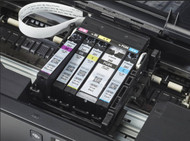
If you use a Canon PIXMA printer, you may have noticed that its ink cartridges have references such as PGI-550, CLI-551, PGI-570 or CLI-571.
The letters at the beginning are useful clues. In many Canon printer systems, PGI cartridges are associated with pigment-based black ink, while CLI cartridges are commonly used for dye-based inks, including colour and photo inks.
But the letters alone are not enough to identify the right replacement. Canon uses different cartridge families across its printers, and some models need several black or specialist colour cartridges.
This guide explains what PGI and CLI mean in practice, how the cartridge numbers are structured and how to check which Canon ink your printer needs.
What Does PGI Mean on a Canon Ink Cartridge?
PGI is a label used on Canon ink cartridge references. In many PIXMA hybrid ink systems, a PGI cartridge contains pigment-based black ink.
Pigment ink is often used for printing everyday documents because it can produce dark, clear text. Canon printer systems may use a separate pigment-black cartridge alongside other inks for colour and photo printing.
For example, a printer that uses the PGI-550 and CLI-551 series may need a PGI-550 pigment-black cartridge as well as CLI-551 cartridges for other inks.
Important: PGI does not tell you which cartridge number your printer needs. PGI-550, PGI-570 and PGI-580 are different cartridge references and should not be treated as interchangeable.
What Does CLI Mean on a Canon Ink Cartridge?
CLI is another Canon cartridge label. In many PIXMA systems, CLI cartridges contain dye-based ink and are used for colour printing, photo printing or an additional black ink.
A printer may use CLI cartridges in:
-
Black
-
Cyan
-
Magenta
-
Yellow
-
Additional colours, such as grey or photo blue, on some models
The exact combination depends on the printer. Some Canon models use a CLI black cartridge as well as a PGI pigment-black cartridge. Other printers use a different cartridge arrangement.
Check the ink references specified for your exact printer before ordering.
PGI vs CLI: What's the Difference?
Here's a simple guide to the distinction found in many Canon PIXMA hybrid ink systems:
| Cartridge label | Common role in hybrid PIXMA systems | Typical use |
|---|---|---|
| PGI | Often pigment-based black ink | Everyday text and documents |
| CLI | Often dye-based ink, including colour inks | Colour graphics and photos; some models also use CLI black |
Pigment and dye inks behave differently, but the label is only a starting point. Canon has different ink systems across its printer range, so don't use this table as a substitute for checking your printer's cartridge list.
Canon's own printer manuals show the specific cartridge references and colours for each supported model. For instance, some manuals list a PGI pigment-black cartridge alongside CLI black, cyan, magenta and yellow cartridges.
Why Does My Canon Printer Need Both PGI and CLI Cartridges?
A printer that uses both types can draw on different inks for different printing tasks.
In a typical hybrid system:
-
Pigment black can be used for sharp, readable text.
-
Dye-based inks can be used to produce colour and photo output.
-
A separate CLI black may be used for photo printing or other printer-specific functions.
This means that a printer may have two cartridges that both look like black ink, but they are not necessarily the same type or suitable for the same slot.
If your printer shows that black ink is low, check which black cartridge it is referring to. The PGI and CLI black cartridges may have different references.
What Do the Numbers and Letters After PGI or CLI Mean?
The number identifies a particular cartridge family. For example:
-
PGI-550 and CLI-551
-
PGI-570 and CLI-571
-
PGI-580 and CLI-581
-
PGI-520 and CLI-521
These pairs are used in particular Canon printer ranges. The similar numbers do not mean the cartridges are interchangeable with other families.
The letters after the number usually identify the colour or ink variant. You may see:
| Marking | Common meaning |
|---|---|
| PGBK | Pigment black |
| BK | Black |
| C | Cyan |
| M | Magenta |
| Y | Yellow |
| GY | Grey |
| PB | Photo blue |
The exact labels can vary by cartridge family. Check the cartridge packaging and your printer's manual for the correct colour and reference.
What Does XL or XXL Mean on Canon PGI and CLI Cartridges?
Some Canon cartridge families are available in standard and higher-capacity versions.
You may see a reference followed by XL or XXL, such as PGI-580XL or CLI-581XXL. These versions are designed to hold more ink than the standard-capacity equivalent.
A higher-capacity cartridge may be useful if you print regularly, as it can reduce how often you need to replace it. Compare the price and stated yield for the exact cartridge before choosing.
Remember that the capacity suffix does not make a cartridge compatible with every Canon printer. The printer must support that particular cartridge family and size.
How to Find the Correct Canon PGI or CLI Cartridge
The safest way to choose replacement ink is to check the full printer model and cartridge reference.
1. Find your Canon printer model
Look for the model name or number on the front, top or back of your printer. It may be part of a PIXMA series, such as a TS, MG, MX or iP model.
2. Check the cartridge currently installed
If you can safely access the cartridge, look for the full reference printed on its label. Note the letters, numbers, colour and any XL or XXL marking.
3. Check Canon's ink information for your model
Use your printer's manual or Canon's support information to confirm the cartridges specified for your exact model. Canon's online manuals include ink-model-number pages for many printers.
4. Check the complete cartridge set
Some printers use a PGI cartridge and several CLI cartridges. Others use different combinations or additional colours. Check whether you need one individual cartridge or a complete set.
5. Confirm the product compatibility before ordering
Make sure the product lists your printer model and the exact cartridge reference. If you're uncertain, check with the retailer before buying.
Can I Use Compatible Canon PGI and CLI Cartridges?
Compatible cartridges are third-party replacements designed for the cartridge references and printer models listed by the supplier.
When choosing compatible ink, check:
-
The complete PGI or CLI reference.
-
The colour and capacity.
-
Your exact Canon printer model.
-
Whether you need a single cartridge or a multipack.
At Go Inks, you can browse our Canon ink cartridges and select the series that matches your printer. Our Canon range includes cartridge families such as PGI-550 & CLI-551 and PGI-520 & CLI-521.
If you know your printer model but are unsure which series it uses, check the compatibility information on the relevant product or contact us for help.
Frequently Asked Questions
Is PGI pigment ink and CLI dye ink?
In many Canon PIXMA hybrid ink systems, PGI is used for pigment-based black ink and CLI is used for dye-based inks. This is a helpful general guide, but Canon's ink systems vary. Check the cartridges specified for your printer.
Why does my Canon printer have two black ink cartridges?
Some Canon printers use a pigment-black PGI cartridge for document text and a separate CLI black cartridge for photo or other printing functions. The roles depend on the printer's ink system.
Are Canon PGI and CLI cartridges interchangeable?
No. PGI and CLI are different cartridge references, and the cartridge number, colour and printer compatibility all matter. Use only the cartridge types listed for your exact printer model.
What do PGBK, BK, C, M and Y mean?
These markings commonly identify pigment black, black, cyan, magenta and yellow. Some Canon printers also use specialist inks such as grey or photo blue. Confirm the colour marking in your printer manual.
What is the difference between Canon PGI-550 and PGI-570?
They are different cartridge families. A printer that uses PGI-550 will not automatically accept PGI-570. Check the cartridge reference specified for your printer before buying.
How do I know whether I need PGI or CLI ink?
Check the cartridge number in your printer manual or on the cartridge currently installed. If your printer uses both PGI and CLI, it may need both types as part of its ink set.
Find the Right Canon Ink at Go Inks
PGI and CLI labels can help you understand the type of cartridge your Canon printer uses, but the full cartridge number is what helps you identify the correct replacement.
Before ordering, check your printer model, the cartridge reference, the colour and whether you need standard or high-capacity ink.
Browse the Canon ink cartridge range at Go Inks to find the series for your printer. If you need help identifying the right cartridge, check the product compatibility details or contact us before ordering.