
How to Find the Right Toner Cartridge for Your Printer
Published by Go Inks on 4th Sep 2026
Replacing toner should be straightforward, but finding the correct cartridge can be surprisingly confusing. Printer manufacturers use different cartridge numbers, printer ranges can contain several closely related models, and some machines use separate toner and drum units.
The good news is that you usually don't need to know anything technical to find the right toner. The safest approach is to identify your exact printer model, find the correct toner cartridge number, and then check that the cartridge is listed as compatible with your printer.
This guide explains how to do that before you place an order.
The quickest way to find the right toner
If you still have the old cartridge, the easiest method is often to check the number printed on it.
If you don't have the old cartridge, look for the full printer model number on the machine, its packaging, documentation or printer software.
Then:
-
Find the exact printer model.
-
Find the toner cartridge number associated with that model.
-
Check whether your printer uses standard or high-yield toner.
-
Check whether the printer has a separate drum unit.
-
Decide whether you want a genuine, compatible or remanufactured cartridge.
-
Double-check the compatibility information before ordering.
The important part is not to guess based on the printer brand alone.
Step 1: Find your exact printer model
The printer model is the best starting point when you're trying to identify the correct toner.
You might know that you have a Brother, HP, Canon, Xerox or another brand of laser printer, but that isn't enough on its own. A manufacturer can have many different printer models using different toner cartridges.
For example, a printer described simply as an "HP LaserJet" could use a completely different cartridge from another HP LaserJet model.
Look for the full model number, rather than just the brand or printer family.
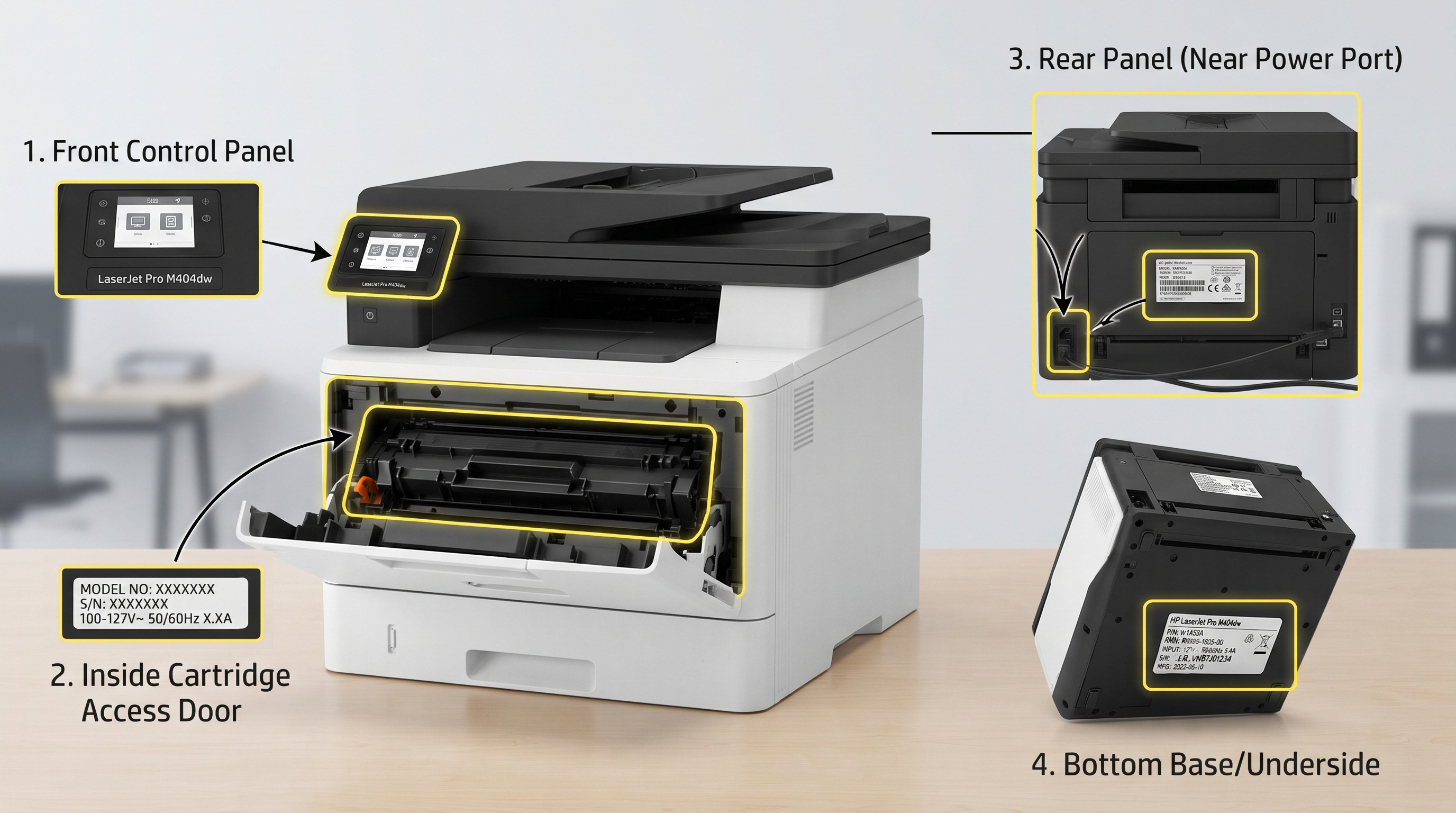
You will commonly find the model number:
-
On the front or top of the printer
-
On a label on the rear or underside
-
Near the control panel
-
On the original printer box
-
In the printer's settings or software
-
In the printer's user manual
If possible, write down the complete model reference, including letters and numbers.
A small difference in the model number can mean a different consumable, so don't leave out letters or suffixes.
Step 2: Check the toner cartridge number
Once you know the printer model, the next thing to identify is the toner cartridge number.
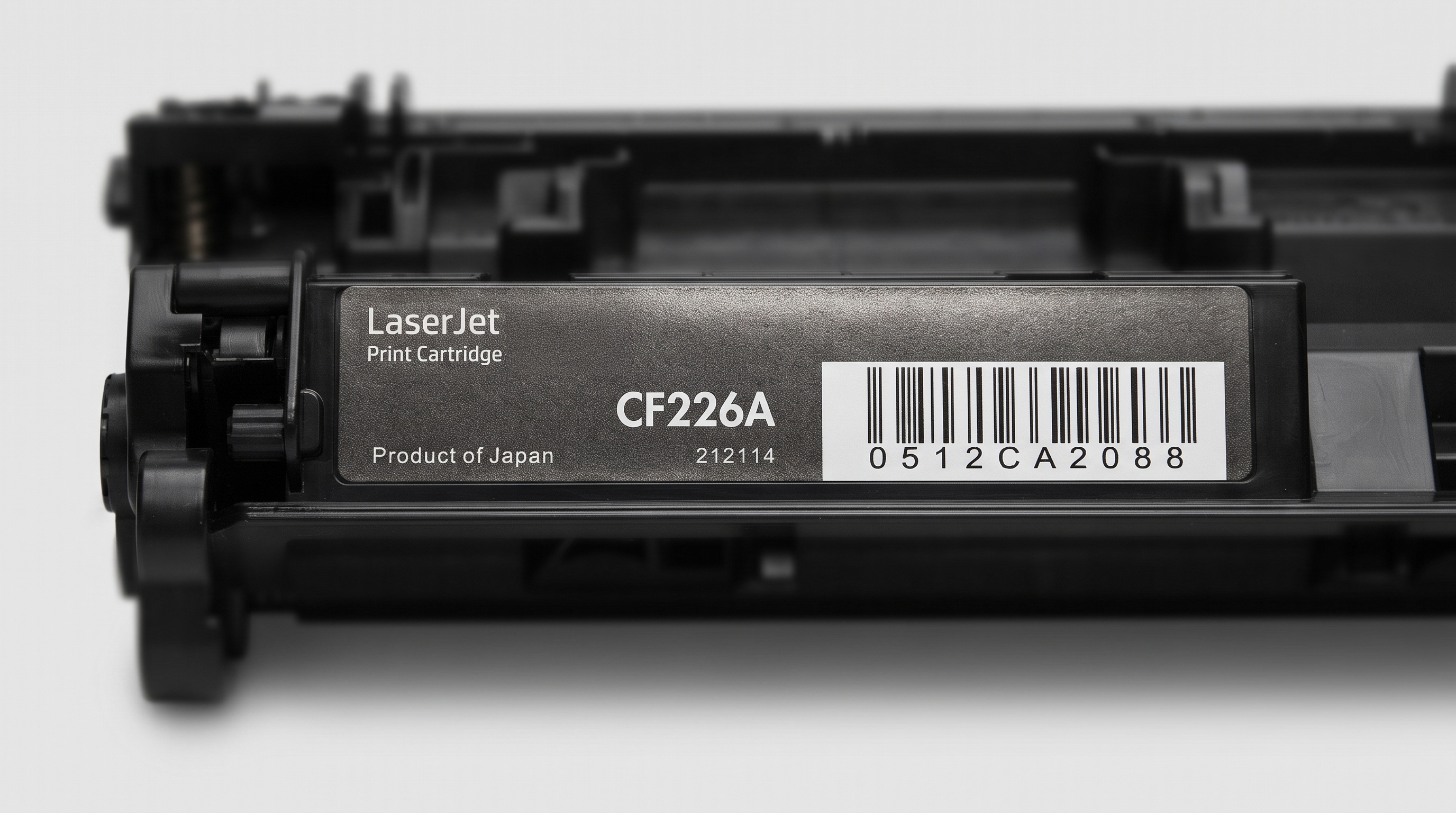
Toner numbers vary between manufacturers. For example, Brother uses references such as TN1050, TN2420 and TN2510, while HP uses a wide range of references including CF, CE, CB and W-series numbers.
Go Inks currently stocks a large range of these toner series, including Brother TN1050, TN2420, TN247, TN248 and TN2510, as well as numerous HP toner series.
If you still have your old cartridge, look carefully at its label. The cartridge reference may also be printed on the original packaging.
However, don't rely on appearance alone.
Two toner cartridges can look very similar but be designed for different printers. The cartridge number and confirmed compatibility are much more reliable than comparing the physical shape of two cartridges.
Step 3: Check the printer model against the toner
This is the most important check before buying.
Once you have the printer model and cartridge number, make sure both match the compatibility information for the replacement toner.
For example, a product may say that it replaces a particular HP or Brother toner number and then list the compatible printer models.
This is much safer than searching for something broad such as "Brother toner" or "HP toner".
Manufacturer stores use the same basic principle. Canon's UK store, for example, allows customers to enter a printer model when checking toner compatibility, while HP's support pages provide cartridge information for specific printer series.
Don't assume that all printers from the same series use the same toner
This is one of the easiest mistakes to make.
A printer family can contain several models with similar names, but their consumables aren't necessarily interchangeable.
Always check the complete model rather than assuming that a cartridge is suitable because the printer "looks like" another model.
Step 4: Check whether you need standard or high-yield toner
Some printers have more than one toner option.
You may see descriptions such as:
-
Standard yield
-
High yield
-
XL
-
Extra high yield
These terms generally refer to the amount of printing the cartridge is designed to provide rather than a completely different type of printer.
If two cartridges are compatible with your printer, the higher-yield option can make sense if you print frequently.
For example, someone printing hundreds of pages for a small business may prefer a higher-yield cartridge because it can reduce how frequently the toner needs replacing.
Someone who only prints occasionally may prefer the lower initial purchase price of a standard-yield cartridge.
The important point is:
Check compatibility first, then compare yield and price.
Don't choose a cartridge simply because it has "XL" or "high yield" in the name.
Step 5: Check whether your printer uses a separate drum
Not every laser printer handles toner in exactly the same way.
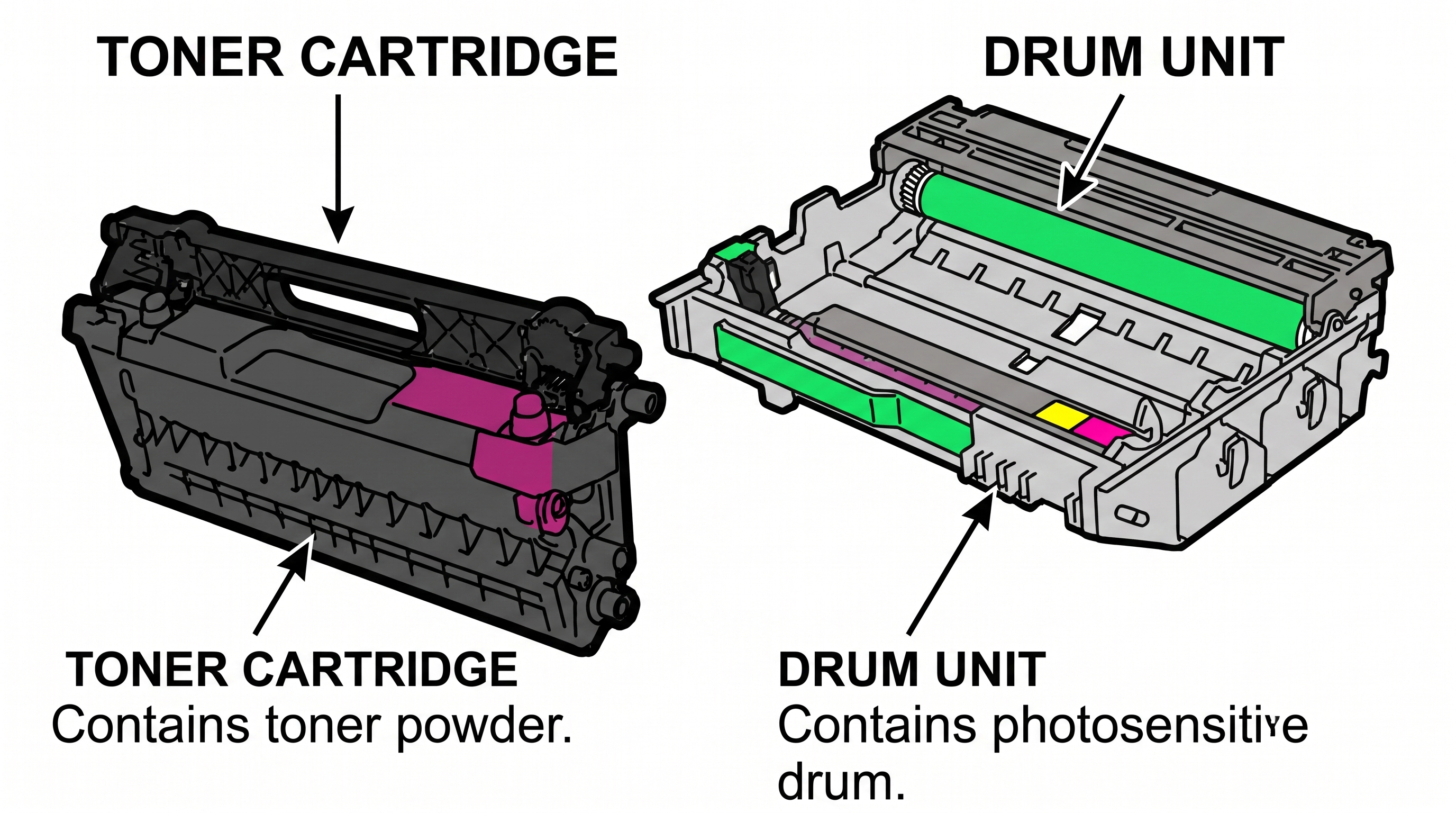
Some printers use a toner cartridge that incorporates the relevant components into one replaceable unit. Other printers use a separate toner cartridge and drum unit.
This is particularly important with some Brother laser printers, where toner and drum products are sold separately.
Go Inks has a separate range of Brother drum units, including DR1050, DR2300 and DR3100.
If your printer uses a separate drum, replacing the toner won't necessarily solve every print-quality problem.
For example, if you are seeing repeating marks, lines or other print defects, the problem may not simply be that the toner has run out.
So before ordering, check whether your printer requires:
-
A toner cartridge only
-
A toner cartridge and separate drum
-
Another replaceable consumable
If you're unsure, check your printer's manual or manufacturer's support information.
Step 6: Decide whether you want genuine or compatible toner
Once you've established which toner you need, you may have a choice between a manufacturer's original cartridge and a compatible alternative.
Genuine toner
Genuine toner is manufactured or supplied by the printer manufacturer for its printers.
Compatible toner
Compatible toner is made by another manufacturer as an alternative to the original cartridge and is designed for the specified compatible printers.
Go Inks specialises in compatible toner cartridges for brands including Brother, HP, OKI, Samsung and Xerox.
The important thing when buying a compatible cartridge is to check that the product clearly states the printer models and cartridge reference it is designed to replace.
A compatible cartridge should not be presented as though it were an original manufacturer cartridge. Go Inks' product pages clearly identify its toner as compatible/non-OEM products and list the relevant printer compatibility.
Step 7: Be careful with toner numbers
Toner references can be confusing because manufacturers use different naming systems.
For example, a cartridge can have both a manufacturer's part number and another number commonly used to identify the same cartridge family.
This is particularly common with HP toner, where a cartridge may be identified using both a letter-number reference and a shorter series number.
The Go Inks toner range reflects this in product and category naming. For example, its HP toner range includes references such as CF244A (44A) and numerous other HP cartridge families.
If you have an old cartridge, don't copy just part of the number if you can avoid it. Record the complete reference and then compare it against the replacement product.
A simple toner compatibility checklist
Before ordering, check these five things:
| Check | What to look for |
|---|---|
| Printer brand | Brother, HP, Canon, Xerox, etc. |
| Exact printer model | The complete model number |
| Toner number | The full cartridge reference |
| Yield | Standard, high-yield or other available option |
| Drum | Check whether your printer uses a separate drum |
If all five checks make sense, you're much less likely to order the wrong cartridge.
What if I can't find the toner number?
Don't guess.
If you no longer have the original cartridge, start with the exact printer model.
You can then check:
-
The printer manufacturer's support website.
-
Your printer's manual.
-
The printer's software or settings.
-
A reputable toner supplier's compatibility information.
-
The product listing for the replacement cartridge.
A useful supplier should provide the compatible printer models alongside the toner reference.
Go Inks' toner category allows customers to search for toner by printer model or cartridge series, while individual toner categories provide further product-level compatibility information.
If you're still unsure, it's better to check before ordering than to assume a cartridge will fit.
What if I have several printers?
If you use more than one printer at home or in a small office, it can be useful to keep a simple record of the consumables each printer takes.
For example:
| Printer | Toner |
|---|---|
| Brother [model] | TN-XXXX |
| HP LaserJet [model] | CFXXXX |
| Brother [model] | TN-XXXX |
This can make reordering much easier, particularly if you manage several printers.
For a small business, keeping a record can also help prevent someone from ordering a cartridge for the wrong machine.
What if my printer doesn't recognise the new toner?
If you've bought a replacement cartridge and the printer doesn't recognise it, don't immediately assume that the toner itself is faulty.
First check:
-
The toner number matches your printer.
-
The complete printer model is included in the compatibility information.
-
The cartridge is installed correctly.
-
Any protective packaging or seals have been removed as instructed.
-
The printer is showing a cartridge-related message rather than a separate drum or hardware issue.
Some printers can also have manufacturer-specific cartridge policies or security features. HP, for example, documents cartridge-policy and cartridge-protection features on some LaserJet models.
If a printer continues to report a problem, consult the manufacturer's instructions for your specific model rather than repeatedly installing and removing the cartridge.
Can I use compatible toner in my printer?
Compatible toner can be an alternative to an original manufacturer's cartridge, provided that the cartridge is specifically designed for your printer model and the product is correctly identified as compatible.
The key is to buy based on confirmed compatibility, rather than choosing the cheapest cartridge that appears to have a similar number.
For Go Inks products, the product descriptions identify the cartridge being replaced and the compatible printer models.
If you're looking for a lower-cost alternative to original toner, you can browse the Go Inks range of compatible laser toner cartridges by brand and cartridge series.
Find the right toner before you order
The safest way to identify your toner is simple:
Find your exact printer model → find the toner number → check compatibility → check the yield → check whether you need a separate drum.
Don't rely on the printer brand alone, and don't choose a cartridge simply because it looks similar to your old one.
If you know your printer model or toner number, you can browse the Go Inks toner cartridge range and select the relevant brand or toner series. If you're still unsure which cartridge you need, check the compatibility information before ordering.
Getting the right toner first time can save you the cost and inconvenience of ordering a cartridge that isn't suitable for your printer.
Frequently Asked Questions - FAQ
How do I know which toner cartridge my printer uses?
Start by finding the exact model number of your printer. Then use the manufacturer's documentation or a reputable supplier's compatibility information to identify the correct toner cartridge number.
Can I find the toner number on the old cartridge?
Often, yes. If you still have the old toner cartridge, check its label or packaging for the cartridge reference. Always compare that number with the compatibility information for your printer before ordering.
Does the printer brand tell me which toner I need?
No. Knowing that you have an HP, Brother, Canon or another brand is not normally enough. You should identify the complete printer model because different models can use different toner cartridges.
What's the difference between standard and high-yield toner?
Both can be compatible with the same printer in some cases, but they are designed to provide different page yields. Check the manufacturer's or supplier's stated compatibility and page yield before choosing between them.
Do I need to replace the drum when I replace the toner?
Not necessarily. Some laser printers use separate toner and drum units, while others use different cartridge arrangements. Check your specific printer before ordering a drum or assuming that one needs replacing.
Can I use compatible toner instead of genuine toner?
A compatible toner cartridge can be used as an alternative to an original cartridge when it is specifically designed for the printer in question. Always check the exact printer and cartridge compatibility before buying.